


If you manage an outbound SDR team buying insurance leads, you’ve probably noticed something shifting over the last six months: your contact rate is down, your agents are frustrated, and even “good” numbers are getting tagged. AI call screening - built into iPhone software, baked into AT&T’s network, and downloaded by millions via apps like Nomorobo and YouMail - has moved from a fringe nuisance to a daily operational reality.
And it’s getting worse. Apple’s iOS call screening feature started prompting users to turn it on in late 2026. As more people upgrade and say yes, a larger percentage of your lead pool will screen calls before they even ring. If your team doesn’t have a plan, you’re not just leaving contacts on the table - you’re leaving revenue there too.
This guide breaks down what’s actually happening, what we’ve tested, and what operational practices hold up when AI is the gatekeeper.
Why “Spam Risk” and “Maybe: Name” Are Showing Up More Often
Two things are converging at once: carrier-level spam blocking and device-level AI screening.
On the carrier side, AT&T is the most aggressive. Even legitimate outbound callers get labeled “Potential Spam” if their numbers don’t pass certain behavioral thresholds - call duration patterns, abandonment rates, complaint volume, and consistency of dialing. Verizon and T-Mobile have similar systems; they’re just less trigger-happy.
On the device side, Apple’s new call screening feature in iOS 18 introduces something most teams weren’t ready for: the phone itself asks callers to state their name and reason for calling before the line ever connects to the consumer. Google has had call screening on Android for years. It’s now a cross-platform standard.
|
The “Maybe: [Name]” display you’re seeing? That’s actually the system working the way it’s supposed to - your agent stated their name in the screening prompt, and the phone pulled it in. The bad news: if your agent doesn’t know how to handle that screening moment, the call dies there. |
Third-party apps like RoboKiller, YouMail, and Nomorobo add another layer on top of all of this, though those have been more figure-out-able operationally. Google’s call screening has been the hardest to navigate. The phone manufacturers and the carriers are now the primary gatekeepers - and they’re learning.
Multi-Channel Isn’t Optional Anymore: Calls + Texts + Email Working Together
Here’s something the “just call more” crowd gets wrong: the screening problem isn’t just about any single call. It’s about whether the consumer’s device recognizes you as a real entity worth answering.
When you reach out via text or email before or alongside your calls, something useful happens. The consumer’s phone starts connecting your name to your number. That’s why you see “Maybe: Andrew” show up on the call - the device has context from a prior text or email interaction and surfaces a name it associates with that contact.
This isn’t a trick. It’s how multi-channel outreach was always supposed to work.
The Cadence That Makes Sense
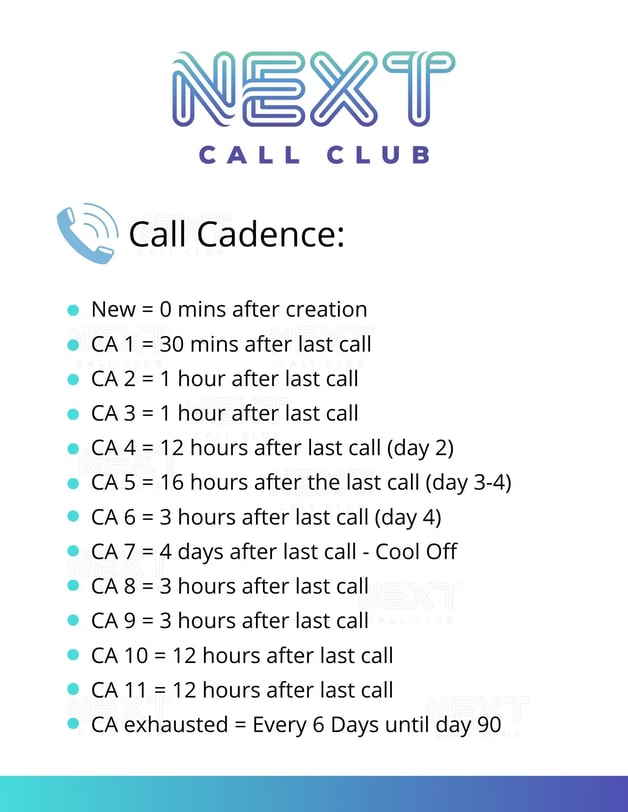
- Immediate: 0–30 seconds after lead receipt: Launch your first call attempt and send an initial text simultaneously. Speed-to-lead matters, and the text creates a paper trail of recognition.
- First week: Day 1–7: Continue a consistent call cadence alongside automated text follow-ups. Your goal is 11+ meaningful touchpoints across channels - not harassment, but presence.
- Long game: Day 7–90: Stay in cadence. Calls, texts, and email working together over a full 90-day window mean you’re not just chasing the 2% who were ready to buy on day one.
- Use phone numbers that have had adequate rest between campaigns - roughly 6 months between prior heavy use and new deployment
- Get your CNAM (Caller Name) updated so your name displays correctly when you call - basic hygiene most teams skip
- Scrub your list against DNC (Do Not Call) registries before any outbound campaign launches
- Confirm you have proper consent for the contact method you’re using - especially for text messaging
- Assign one phone number to one purpose. Don’t run sales calls and appointment reminders off the same number - carriers can detect mixed-use patterns
- Do not rotate numbers. Carriers flag rotation behavior as a spam signal, even if each number is clean
- Keep your daily dial volume consistent. Spikes up or down feed the spam algorithm. Steady and deliberate is what you want
- Cap same-number contact attempts per day at 2–3, with at least 4 hours between attempts to the same contact
- Set a hard cap on total attempts per lead - 10 is a reasonable ceiling before you shift strategy
- Call during normal business hours - “technically legal” and “operationally smart” aren’t the same thing
- Keep your abandonment rate under 2%. When your dialer answers a call, and no agent is available, that’s a spam signal
- Always leave a voicemail. State your name, your company, the reason for the call, and what you want them to do. Every voicemail is now transcribed by AI - write it accordingly
- Double-tapping: Calling twice in rapid succession (“double-tapping”) doesn’t break through screening - it trains the algorithm to flag your number faster.
- Short-duration calls: When calls connect and disconnect in under 10–15 seconds repeatedly, that pattern looks like robodialing to a carrier. Longer, completed conversations signal legitimacy.
- Skipping voicemails: Skipping voicemails to save time costs you callbacks and name recognition - both of which make future call attempts more likely to connect.
- Number rotation: Switching numbers frequently to “stay fresh” is one of the clearest spam signals carriers watch for. A consistent, well-behaved number builds reputation over time.
- Volume spikes: If you dial 200 contacts on Monday and 800 on Friday, the algorithm notices. Flat, consistent volume looks like a real business. Spikes look like evasion.
- Calling from multiple CRMs simultaneously: Yes, people are doing this. No, it doesn’t work. Yes, it makes your compliance exposure significantly worse.
- Abandoning calls altogether: Replacing phone calls with email-only or text-only outreach because screening is frustrating guarantees you’ll never close those leads. The call is where the deal gets done.
The simple principle: the more times your name shows up in a consumer’s world - across different channels - the more likely their phone and their memory recognize you as a real person, not a robo-operation.
|
Before you build out a texting campaign, make sure consent is locked in. Texting someone who only opted in for a call-back is a different legal territory than calling them. Get this right before you scale. |
What We Actually Tested (And What Moved the Needle)
We’re not going to hand you a script to “beat” AI screening. That framing is wrong, and anything that claims to be a permanent hack will get patched. What we can share is the type of thinking that got us to a meaningful improvement in screening pass-through rates.
What We Tested
We ran roughly 10 script variations through the Apple screening prompt - different combinations of agency name, carrier name, caller name, and various mixes of all three. The variable that produced the fastest improvement in the phone’s display (from nothing to “Maybe: [Name]”) was the caller stating their name clearly and first. Simple, direct, human.
What We Learned About Tone
Conciseness helped - but too short felt robotic and still got blocked. Too long triggered pattern-matching that flagged the call. The AI isn’t just listening to words; it’s picking up on pacing, structure, and delivery. Agents who sounded like they were reading a script performed worse than agents who sounded like they were leaving a message for a neighbor.
The Bottom Line on Scripting
|
Your agents need a clear, honest, short message for the screening prompt - one that states who they are, where they’re calling from, and why the consumer would want to respond. Everything else is delivery. Train on that. The goal isn’t to fool the AI. The goal is to sound like a person worth calling back. |
Operational Best Practices That Carriers Actually Reward
This is where teams leave the most on the table. Carrier spam algorithms are watching behavioral patterns, not just individual calls. Here’s what keeps your numbers clean:
Before You Ever Dial
- Use phone numbers that have had adequate rest between campaigns - roughly 6 months between prior heavy use and new deployment
- Get your CNAM (Caller Name) updated so your name displays correctly when you call - basic hygiene most teams skip
- Scrub your list against DNC (Do Not Call) registries before any outbound campaign launches
- Confirm you have proper consent for the contact method you’re using - especially for text messaging
How You Set Up Your Campaigns
- Assign one phone number to one purpose. Don’t run sales calls and appointment reminders off the same number - carriers can detect mixed-use patterns
- Do not rotate numbers. Carriers flag rotation behavior as a spam signal, even if each number is clean
- Keep your daily dial volume consistent. Spikes up or down feed the spam algorithm. Steady and deliberate is what you want
Dialer Settings That Matter
- Cap same-number contact attempts per day at 2–3, with at least 4 hours between attempts to the same contact
- Set a hard cap on total attempts per lead - 10 is a reasonable ceiling before you shift strategy
- Call during normal business hours - “technically legal” and “operationally smart” aren’t the same thing
- Keep your abandonment rate under 2%. When your dialer answers a call, and no agent is available, that’s a spam signal
- Always leave a voicemail. State your name, your company, the reason for the call, and what you want them to do. Every voicemail is now transcribed by AI - write it accordingly
|
Stay on the call. Hanging up mid-dial - before the line fully connects or before a voicemail plays out - hurts your number’s reputation with carriers. See it through. |
The Real Cost of Call Screening (Simple Math)
Most agency owners think about call screening as a minor inconvenience. Run the numbers, and it stops looking minor.
Take a team buying 1,000 leads per month at $7 each. That’s a $7,000 monthly spend. If AI call screening is hurting your contact rate and you’re only quoting 10% of leads, you’re generating 100 quotes. If you handle screening well and push that to 17%, you get 170 quotes.
|
Metric |
Without Screening Fix |
With Screening Fix |
|
Leads purchased (monthly) |
1,000 |
1,000 |
|
Quote rate |
10% |
17% |
|
Households quoted |
100 |
170 |
|
Household close rate |
10% |
10% |
|
Additional households sold |
- |
+7 |
|
Est. additional premium (3 items @ $1,000 avg) |
- |
$21,000 |
|
Est. additional agency revenue |
- |
$2K–$5K/mo |
Over a year, that’s the equivalent of a full employee’s salary hiding inside your contact rate. And because the consumers most likely to use call screening tend to be tech-savvy, financially aware households - exactly the type you want to write - the extra effort to reach them is worth it. Lean into the friction.
Common Mistakes That Trigger Spam Labels
These are the patterns that will get your numbers flagged - and some of them are being passed around as tips in agency circles right now.
- Double-tapping: Calling twice in rapid succession (“double-tapping”) doesn’t break through screening - it trains the algorithm to flag your number faster.
- Short-duration calls: When calls connect and disconnect in under 10–15 seconds repeatedly, that pattern looks like robodialing to a carrier. Longer, completed conversations signal legitimacy.
- Skipping voicemails: Skipping voicemails to save time costs you callbacks and name recognition - both of which make future call attempts more likely to connect.
- Number rotation: Switching numbers frequently to “stay fresh” is one of the clearest spam signals carriers watch for. A consistent, well-behaved number builds reputation over time.
- Volume spikes: If you dial 200 contacts on Monday and 800 on Friday, the algorithm notices. Flat, consistent volume looks like a real business. Spikes look like evasion.
- Calling from multiple CRMs simultaneously: Yes, people are doing this. No, it doesn’t work. Yes, it makes your compliance exposure significantly worse.
- Abandoning calls altogether: Replacing phone calls with email-only or text-only outreach because screening is frustrating guarantees you’ll never close those leads. The call is where the deal gets done.
Compliance Is Not a Checkbox - It’s Part of the Strategy
A few things worth stating clearly, because this is the area where well-intentioned teams get themselves into trouble:
Every voicemail you leave is being transcribed. AI is doing it in real time. What you say is now a written record. Treat it that way.
TCPA compliance hasn’t changed just because the environment has gotten harder. Honor DNC requests. Call within permitted hours. Get consent before texting. If a consumer asks to be removed, act on it.
|
The goal is persistent, not pushy. Consistent follow-up over 90 days is different from calling someone three times a day from three different reps. Regulators know the difference, and so do consumers. |
Disclaimer: Nothing in this post constitutes legal advice. TCPA regulations, state mini-TCPA laws (Florida, Texas, Oklahoma, and others have specific rules), and FCC guidance evolve frequently. Consult qualified legal counsel before building or scaling any outbound contact program.
The 12-Month Outlook: What’s Coming and What to Do Now
The problem is getting worse, not better. Apple’s call screening feature launched less than six months ago and is still growing as more users upgrade to iOS 18. The carriers are tightening their spam algorithms continuously. The AI systems on both ends - your dialer and their phone - are learning from every interaction.
From an SDR operations standpoint, the situation has stabilized in the sense that there are now known best practices that work. But “working” today means something different than “working” six months from now. The AI keeps learning. What breaks through today gets adapted around tomorrow.
What That Means Practically
Stop thinking of this as a call problem and start thinking of it as an omnichannel problem. Pure outbound phone volume, scaled without intent, will keep hitting walls. The teams building sustainable contact rates are combining clean outbound calling with systematic text campaigns, email sequences, and genuine brand recognition across touchpoints.
Branded caller ID, consistent CNAM, multi-channel cadence, and compliant behavior aren’t just nice-to-haves. They’re the foundation of a contact rate that holds up as the gatekeepers get smarter. Invest in those foundations now.
Frequently Asked Questions
What is AI call screening, and why is it affecting my insurance SDR team now?
AI call screening is a feature built into smartphones (most notably Apple’s iOS 18 and Android’s Google Call Screening) and offered by major carriers that intercepts calls from unknown numbers and asks callers to identify themselves before connecting. It’s hitting insurance teams harder now because Apple introduced and began prompting users to enable it in late 2025, dramatically expanding the percentage of leads who have it active.
What’s the difference between carrier spam blocking and iOS call screening?
Carrier-level spam blocking happens at the network level - AT&T, Verizon, and T-Mobile flag numbers that exhibit spam-like calling patterns and may show “Spam Risk” or “Potential Spam” on the consumer’s display. iOS call screening is device-level: Apple’s software intercepts the call, prompts you to state your name and reason for calling, and lets the consumer decide whether to answer. Both can happen independently, and both can stop a contact before you get a word in.
What is CNAM and how does it help with spam labeling?
CNAM stands for Caller Name - the database that determines what name displays when you call someone. If your CNAM record is outdated, blank, or doesn’t match what your agents say in calls and voicemails, it creates a trust gap that spam algorithms exploit. Keeping CNAM current and consistent with your branded caller ID is basic hygiene that a surprising number of teams skip.
Does branded caller ID prevent spam labels?
Branded caller ID helps, but it’s not a silver bullet. A number can still get tagged as spam if the behavioral patterns behind it - call duration, abandonment rate, complaint volume, dial consistency - look problematic to carrier algorithms. Branding works best as part of a clean, compliant outbound operation.
What’s the right number of call attempts before I move on from a lead?
A reasonable guideline is 10 total attempts across a 90-day window, with no more than 2–3 per day and at least 4 hours between same-day attempts to the same contact. Supplement calls with text and email touchpoints throughout. After 90 days of no response, shift that lead to a long-term nurture sequence.
How does call screening affect my lead ROI?
The difference between a 10% and a 17% quote rate on a 1,000-lead monthly buy at $7 per lead translates to roughly $2,000 to $5,000 in additional monthly revenue at standard close rates. Over a year, that’s material. And the consumers most likely to use call screening are often the most tech-savvy and financially capable - worth the extra effort to reach.
Is it legal to try to get through AI call screening?
Stating your name and purpose when an AI screening prompt asks you to is not just legal - it’s exactly what those systems are designed to prompt. The practices to avoid are the ones that mimic harassment: calling the same number multiple times in rapid succession, rotating numbers to avoid pattern detection, or misrepresenting who you are. Transparent, honest, persistent outreach within TCPA and state-level guidelines is both legal and effective.
|
Wondering how your outbound setup actually stacks up? If your contact rate has dropped and you’re not sure whether it’s a screening issue, a number health issue, or a scripting issue - the answer is usually a combination of all three. A structured outbound audit looks at your number health, CNAM status, dialer settings, abandonment rate, voicemail leave rate, and multi-channel cadence against the benchmarks that carriers and device AI are actually using to evaluate your calls. No pitch - just a straight assessment of where the gaps are and what’s worth fixing first. |
Disclaimer: This content is for informational purposes only and does not constitute legal advice. TCPA regulations and state-level telecommunications laws vary and are subject to change. Consult qualified legal counsel before building or modifying any outbound contact program.
Leave a Reply